


Show EOL distros:
urdf_tools: arm_kinematics | joint_state_publisher | simmechanics_to_urdf | simmechanics_tutorial | urdf_python | urdf_tutorial
Package Summary
A node for publishing joint angles, either through a gui, or with default values.
- Author: David Lu!!
- License: BSD
- Source: hg https://kforge.ros.org/robotmodel/visualization (branch: default)
urdf_tools: arm_kinematics | joint_state_publisher | simmechanics_to_urdf | simmechanics_tutorial | urdf_python | urdf_tutorial
Package Summary
A node for publishing joint angles, either through a gui, or with default values.
- Author: David Lu!!
- License: BSD
- Source: hg https://kforge.ros.org/robotmodel/visualization (branch: default)
visualization
Package Summary
A node for publishing joint angles, either through a gui, or with default values.
- Author: David Lu!!
- License: BSD
- Source: git https://github.com/ros/robot_model.git (branch: groovy-devel)
Package Summary
This package contains a tool for setting and publishing joint state values for a given URDF.
- Maintainer status: maintained
- Maintainer: David V. Lu!! <davidvlu AT gmail DOT com>
- Author: David V. Lu!! <davidvlu AT gmail DOT com>
- License: BSD
- Source: git https://github.com/ros/robot_model.git (branch: hydro-devel)
Package Summary
This package contains a tool for setting and publishing joint state values for a given URDF.
- Maintainer status: maintained
- Maintainer: Chris Lalancette <clalancette AT osrfoundation DOT org>, Shane Loretz <sloretz AT osrfoundation DOT org>
- Author: David V. Lu!! <davidvlu AT gmail DOT com>, Jackie Kay <jacquelinekay1 AT gmail DOT com>
- License: BSD
- Bug / feature tracker: https://github.com/ros/joint_state_publisher/issues
- Source: git https://github.com/ros/joint_state_publisher.git (branch: indigo-devel)
Package Summary
This package contains a tool for setting and publishing joint state values for a given URDF.
- Maintainer status: maintained
- Maintainer: Chris Lalancette <clalancette AT osrfoundation DOT org>, Shane Loretz <sloretz AT osrfoundation DOT org>
- Author: David V. Lu!! <davidvlu AT gmail DOT com>, Jackie Kay <jacquelinekay1 AT gmail DOT com>
- License: BSD
- Source: git https://github.com/ros/robot_model.git (branch: indigo-devel)
moveit_resources: joint_state_publisher | moveit_resources_fanuc_description | moveit_resources_fanuc_moveit_config | moveit_resources_panda_description | moveit_resources_panda_moveit_config | moveit_resources_pr2_description | robot_state_publisher
Package Summary
This package contains a tool for setting and publishing joint state values for a given URDF.
- Maintainer status: maintained
- Maintainer: Chris Lalancette <clalancette AT osrfoundation DOT org>, Shane Loretz <sloretz AT osrfoundation DOT org>
- Author: David V. Lu!! <davidvlu AT gmail DOT com>, Jackie Kay <jacquelinekay1 AT gmail DOT com>
- License: BSD
- Bug / feature tracker: https://github.com/ros/joint_state_publisher/issues
- Source: git https://github.com/ros/joint_state_publisher.git (branch: kinetic-devel)
Package Summary
This package contains a tool for setting and publishing joint state values for a given URDF.
- Maintainer status: maintained
- Maintainer: Chris Lalancette <clalancette AT osrfoundation DOT org>, Shane Loretz <sloretz AT osrfoundation DOT org>
- Author: David V. Lu!! <davidvlu AT gmail DOT com>, Jackie Kay <jacquelinekay1 AT gmail DOT com>
- License: BSD
- Bug / feature tracker: https://github.com/ros/joint_state_publisher/issues
- Source: git https://github.com/ros/joint_state_publisher.git (branch: kinetic-devel)
robot: control_msgs | diagnostics | executive_smach | filters | geometry | joint_state_publisher | kdl_parser | kdl_parser_py | robot_state_publisher | ros_base | urdf | urdf_parser_plugin | xacro
Package Summary
This package contains a tool for setting and publishing joint state values for a given URDF.
- Maintainer status: maintained
- Maintainer: Chris Lalancette <clalancette AT osrfoundation DOT org>, Shane Loretz <sloretz AT osrfoundation DOT org>
- Author: David V. Lu!! <davidvlu AT gmail DOT com>, Jackie Kay <jacquelinekay1 AT gmail DOT com>
- License: BSD
- Bug / feature tracker: https://github.com/ros/joint_state_publisher/issues
- Source: git https://github.com/ros/joint_state_publisher.git (branch: kinetic-devel)
moveit_resources: joint_state_publisher | moveit_resources_dual_panda_moveit_config | moveit_resources_fanuc_description | moveit_resources_fanuc_moveit_config | moveit_resources_panda_description | moveit_resources_panda_moveit_config | moveit_resources_pr2_description | moveit_resources_prbt_ikfast_manipulator_plugin | moveit_resources_prbt_moveit_config | moveit_resources_prbt_pg70_support | moveit_resources_prbt_support | robot_state_publisher
Package Summary
This package contains a tool for setting and publishing joint state values for a given URDF.
- Maintainer status: maintained
- Maintainer: Chris Lalancette <clalancette AT osrfoundation DOT org>, Shane Loretz <sloretz AT osrfoundation DOT org>
- Author: David V. Lu!! <davidvlu AT gmail DOT com>, Jackie Kay <jacquelinekay1 AT gmail DOT com>
- License: BSD
- Bug / feature tracker: https://github.com/ros/joint_state_publisher/issues
- Source: git https://github.com/ros/joint_state_publisher.git (branch: noetic-devel)
Contents
Please note that not all features are available via debian package in groovy or earlier. But all these are available when cloning the branch groovy-devel or later from the repository.
Overview
This package publishes sensor_msgs/JointState messages for a robot. The package reads the robot_description parameter from the parameter server, finds all of the non-fixed joints and publishes a JointState message with all those joints defined.
This package can be used in conjunction with the robot_state_publisher node to also publish transforms for all joint states.
Usage / data input
There are four possible sources for the value of each JointState:
- Values directly input through the GUI
JointState messages that the node subscribes to
- The value of another joint
- The default value
Each is described in details:
GUI
The GUI functionality has been split out of the main joint_state_publisher package into its own package called joint_state_publisher_gui. The old use_gui parameter to joint_state_publisher is removed. For packages transitioning before this change, joint_state_publisher_gui should be added as an <exec_depend> to package.xml and launch files should be updated to launch joint_state_publisher_gui instead of using joint_state_publisher with use_gui parameter.
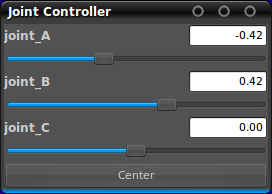
If GUI is present, the package displays the joint positions in a window as sliders. Each slider is set to the joints' min and max limits, except for continuous joints, which range from -Pi to +Pi. Joint velocity limits are not taken into account when publishing joint state messages.
Subscribing JointState messages
Set the source_list parameter, see below.
Dependent Joints
This node also lets you constrain certain joints to be equal to other joints, or multiples of other joints. For example, if you had two separate joints for two wheels, but wanted them to turn at the same rate, you could constrain the rotation of one to be equal to the other. Or, if you had two unequally sized pulleys, and wanted to have one pulley drive the other, you could constrain the second pulley to turn 3 times as fast as the other.
This is can be specified through the dependent_joints parameter or the mimic tag in the URDF.
Default value
The default value is zero. If zero is not a permissible value (max+min)/2 is used. To override the default value for some joints, use the zeros parameter. An example YAML file is seen below.
Node API
joint_state_publisher
Publishes JointState message with values read from various sources, including GUI.Published Topics
joint_states (sensor_msgs/JointState)- Joint State for each non-fixed joint in the robot
Parameters
robot_description (String, default: None)- Contents of the URDF file for the robot
- The keys in the map are the names of the constrained joints. The values are maps which define a parent joint name, and optionally, a factor which to multiply the parent's value by to get the constrained joints value. An example YAML file can be seen below.
- Rate at which joint states are published
- A list of topics to listen on for sensor_msgs/JointState messages.
- Boolean flag to use mimic tags from URDF
- Dictionary to specify some joints' 'zero position' (since hydro)
- (?) Somehow narrow the joint limits using URDF-tag safety_controller.
- Publish the joints' default positions (see Default value above) if no other data input is available.
- Publish the joints' velocities as 0 if no other data input is available.
- Publish the joints' efforts as 0 if no other data input is available.
Example YAML file for dependent_joints and zeros parameters
The following YAML snippets show examples of how to set the dependent_joints and the zeros parameters using YAML syntax. These can be loaded to the parameter server using the <rosparam> tag in a launch file.
dependent_joints:
  joint_D: {parent: joint_A, factor: 3 }
  joint_E: {parent: joint_B }
  joint_F: {parent: joint_C, factor: -1 }
zeros: joint_A: 1.57 joint_B: 0.785
